- Status
- Live
- Version
- 0.8.1
- Platform
- Desktop app
- License
- GPL-3.0
- Sensor
- CAM_FRONT
- Type
- Camera · Basler acA1600-60gc
- Position (x, y, z)
- 1.70, 0.02, 1.51 m
- Boresight yaw · pitch
- 0.3° · 0.3°
- Field (H × V)
- 64.6° × 39.1°
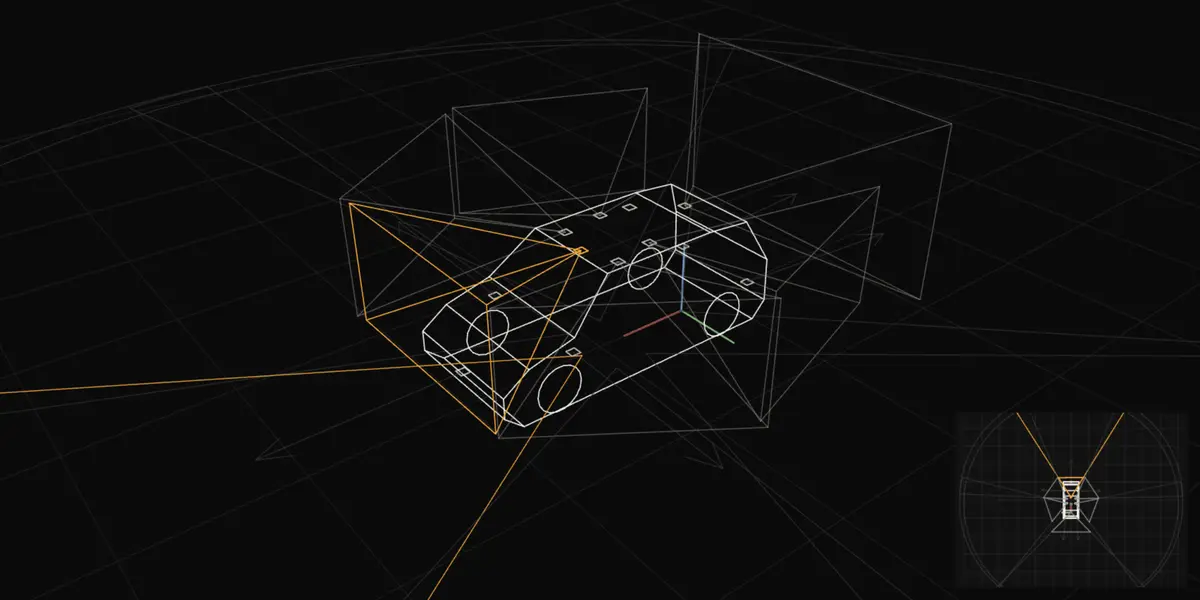
A wireframe hatchback seen from the front left, with each sensor's position marked and its field of view drawn as a frustum and a ground footprint. The selected sensor is highlighted. A plan view from above sits in the lower right corner. The table that follows lists every sensor's pose.
Drag to orbit · arrow keys orbit · + and − zoom · 0 resets · T top view
| Sensor | Type | x, y, z (m) | Yaw | Pitch | HFOV |
|---|---|---|---|---|---|
| CAM_FRONT | Camera | 1.70, 0.02, 1.51 | 0.3° | 0.3° | 64.6° |
| CAM_FRONT_RIGHT | Camera | 1.55, −0.49, 1.50 | −56.4° | 0.8° | 64.8° |
| CAM_BACK_RIGHT | Camera | 1.01, −0.48, 1.56 | −110.8° | 0.9° | 64.8° |
| CAM_BACK | Camera | 0.03, 0.00, 1.58 | 179.9° | −1.0° | 89.3° |
| CAM_BACK_LEFT | Camera | 1.04, 0.48, 1.59 | 108.6° | 0.9° | 65.0° |
| CAM_FRONT_LEFT | Camera | 1.52, 0.49, 1.51 | 55.2° | −0.1° | 64.3° |
| LIDAR_TOP | LiDAR | 0.94, 0.00, 1.84 | −89.9° | 0.3° | — |
| RADAR_FRONT | Radar | 3.41, 0.00, 0.50 | 0.2° | 0.0° | — |
| RADAR_FRONT_LEFT | Radar | 2.42, 0.80, 0.78 | 88.4° | 0.0° | — |
| RADAR_FRONT_RIGHT | Radar | 2.42, −0.80, 0.77 | −91.0° | 0.0° | — |
| RADAR_BACK_LEFT | Radar | −0.56, 0.63, 0.53 | 174.4° | 0.0° | — |
| RADAR_BACK_RIGHT | Radar | −0.56, −0.62, 0.53 | −176.1° | 0.0° | — |
calibrated_sensor.json, as recorded in Vantage's reference-rig library. nuScenes data isCC BY-NC-SA 4.0. Body: a generic hatchback outline scaled to the Renault ZOE (Phase 1)'s stated dimensions. Frustums are drawn to 2.2 m and ground coverage to 12 m: display lengths, not sensing ranges. Radar fields are not in the calibration file, so only their boresights are shown.Before a data-collection vehicle is fitted, it is hard to know what its cameras and sensors will actually record: where the body, rig and other sensors block them, how many pixels land on objects, and how sensitive the layout is to mounting errors. Vantage models this in simulation and then verifies the real installation against the plan.
How it is put together.
A desktop app for designing the sensor rigs of data-collection vehicles, the cars that record the camera data self-driving models are trained on. You import a 3D model of the vehicle, place cameras, lidars, radars, GNSS antennas and IMUs on it, and check in simulation what the rig will record before any hardware is fitted. It then calibrates the real cameras, checks the installed rig and its recorded drives against the plan, and exports the calibration to the data pipeline.
- 1
Desktop UI
Qt main window, docks, OpenGL shader renderer, plan views, camera images, charts and dialogs
vantage/ui/ - 2
Engine
Lens models, mesh and loaders, occlusion, coverage analysis, tolerance, optimiser, sensor studies, calibration and exporters
vantage/core/ - 3
Simulator bridge
CARLA bridge run in CARLA's own Python (bridge, recording, frames, tonemap) and the live rig server
vantage/sim/ - 4
Validation suite
Checks every model against independent references and writes the report (--validate)
vantage/validation/ - 5
Assistant and Copilot
Chat about the open design and Copilot plans (Groq or Claude, with the user's own key) that run only after approval
vantage/assistant/ - 6
MCP server
Model Context Protocol server so Claude Code or Claude Desktop can work on a design
vantage/mcp/ - 7
Reference stitchers
Bird's-eye stitchers in C++17 and Python shipped with the remap-table export (Apache-2.0)
vantage/runtime/
Specification.
- Sensors modelled
- Cameras through their real lens models, plus lidars, radars, GNSS antennas and IMUs from makers' datasheets
- Component library
- 36 camera modules and 52 lenses, 13 vehicles with makers' stated dimensions
- Rig engineering
- 3D-printable brackets, cable harness, power budget, clock tree and trigger plan, recording budget, requirements scorecard
- Simulation
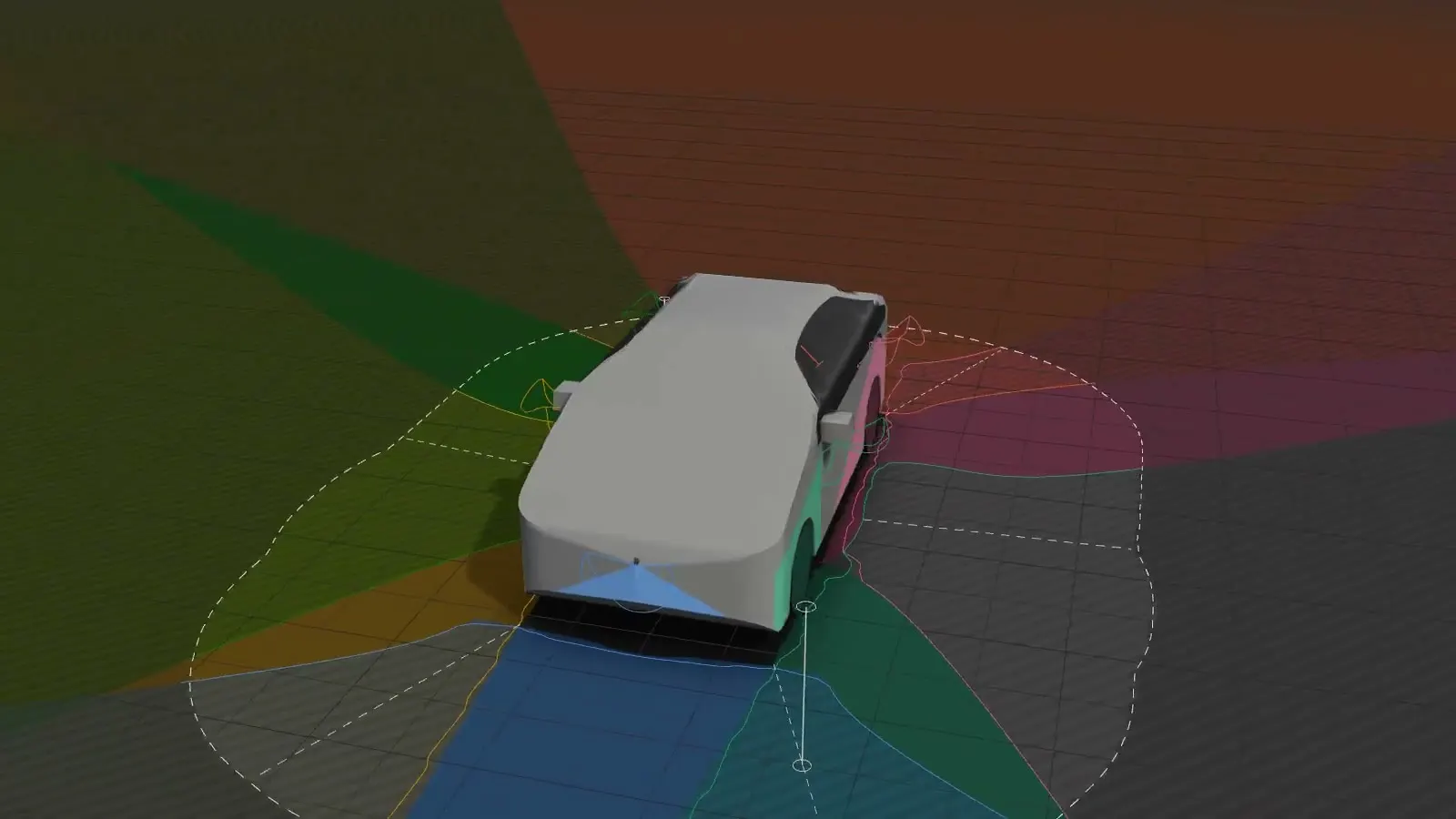
- CARLA 0.9.16 bridge; labelled frames (semantic, instance, range, 2D and 3D boxes) through each fisheye's lens model; fault injection, scenarios and campaigns
- Calibration and checks
- Unit lens calibration, camera-lidar calibration with an observability plan, installation check, online calibration, drive-log check against the plan
- Exports
- OpenCV, ROS 2 (URDF, TF, bags), Kalibr, nuScenes, KITTI, Autoware and more; surround-view remap tables and 3D bowl
- Automation
- Headless batch mode with CI exit codes (--analyse, --export, --check); model validation suite (--validate); MCP server (--mcp) with 97 tools
- Platforms
- Windows 10/11 x64, macOS 14+ (Apple silicon), Linux x86_64 and arm64 (incl. Jetson Orin with JetPack 6)
- Runs on
- PyQt6 desktop application with an OpenGL viewport; gui-script vantage-gui and platform installers
From the app.
Releases.
- v0.8.1Fixes for the Claude provider within the API's tool limits.
- v0.8.0Claude can work on the rig through MCP, with Claude Code in the panel and kept conversations.
- v0.7.1Claude can work on the rig through MCP, with Claude Code in the panel and kept conversations.
- v0.7.0Mast mounting on the roof rack, drive-log error bars and faster board search.
- v0.6.0Live recommended actions.
- v0.5.0CARLA ground truth, detection quality, campaigns and the Copilot.
- v0.4.0CARLA ground truth, detection quality, campaigns and the Copilot.
- v0.3.0
- v0.2.0
- v0.1.1
- v0.1.0First release of the sensor rig planner.
More systems.
Camera, depth and teleop planning for robot-learning data collection
Sensor rigs · ResearchDataCollectionRigSix-camera, GNSS- and IMU-instrumented driving data collection rig on Jetson AGX Orin
Next systemLabeloxAVA data engine for autonomous driving, built for Indian roads