- Status
- Live
- Version
- 2.0.0
- Platform
- Desktop app
- License
- MIT
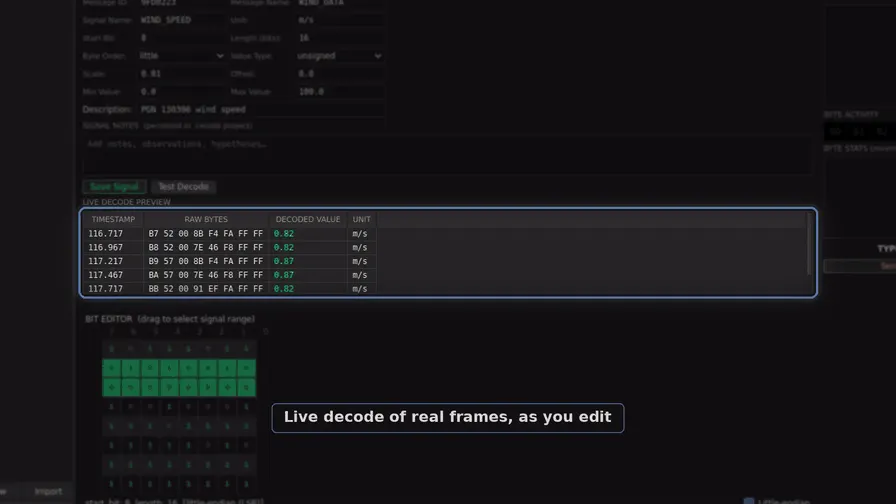
Working out which bytes of an undocumented CAN bus carry which signals, and writing correct definitions for them, is slow and error-prone by hand. CanLab's offline analysis narrows the search to candidate counters, checksums and signal boundaries, and its DBC builder checks definitions against real frames before export.
How it is put together.
CanLab is a PyQt6 desktop workstation for reverse-engineering CAN bus captures. You load a capture, work out which bytes carry what, write the signal definitions, check them against real frames, and export a DBC that other tools can read. It also speaks the diagnostic protocols (UDS, ISO-TP, J1939, OBD-II, XCP, DoIP). For isolated bench use only, it can inject, replay, fuzz and bridge, behind a transmit gate that is disarmed by default.
- 1
Desktop tabs
16 PyQt6 tabs (frames, sniffer, DBC builder, diagnostics, injection and others) grouped into five workspaces
canlab/tabs/ - 2
Log parsers
Every format parsed into the same columns (Timestamp, ID, Bus, DLC, Extended, bytes)
canlab/core/log_parser.py - 3
Receive hub
The only place that calls recv(); hands each frame to subscribers filtered by ID
canlab/core/bus_hub.py - 4
Frame store
Capped ring buffer in preallocated NumPy arrays (500,000 frames by default) with a cached DataFrame built on demand
canlab/core/frame_store.py - 5
Transmit gate
Holds the armed flag, blocked IDs and running transmit workers; every send goes through gated_send
canlab/core/safety.py - 6
MCP server
29 tools over the capture, detectors, DBC and annotations, served in the window or headless; none transmits
canlab/mcp_server.py - 7
Command line
Headless analysis, decode, convert and the capture kit, without importing Qt
canlab/cli.py
Specification.
- Log formats
- SavvyCAN CSV, candump .log (incl. CAN FD), pcap/pcapng, Vector BLF and ASC, MDF4, openpilot rlog/qlog
- Offline analysis
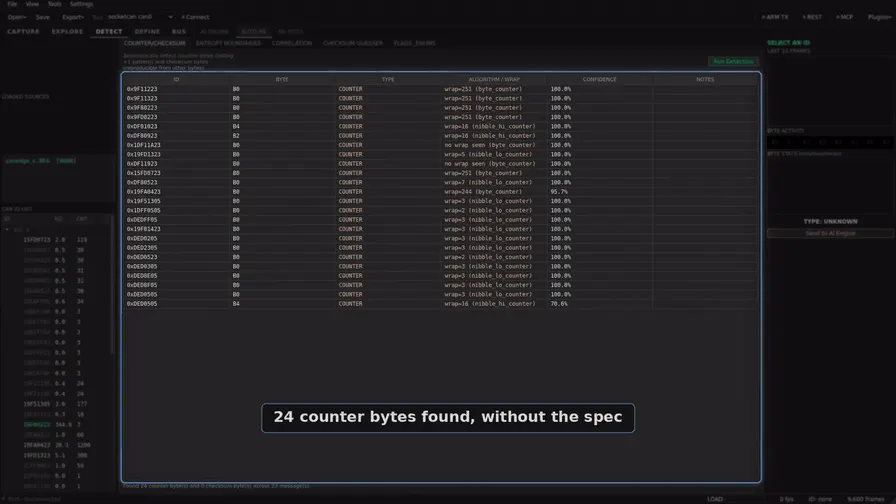
- Counter and checksum detection (CRC-8 and OEM variants), entropy boundaries, correlation, bit-level flags, repeated-block detection, per-byte ML role classification; no API key needed
- Signal finding
- Annotated capture ranks every byte and bit against marked actions; reference-driven calibration fits scale and offset from a CSV or GPX reference
- Diagnostics
- ISO-TP, UDS (read-only scans by default), security access, J1939 with DM1 decode, NMEA 2000, OBD-II (78 mode 01 PIDs), XCP (read-only), DoIP
- DBC ecosystem
- Import DBC, ARXML and CAN matrix; export DBC, openpilot DBC, CANdb++, ARXML 4.3 and Wireshark Lua dissectors, each loaded back by the tool that reads it
- Transmit safety
- Global ARM TX gate disarmed by default, one gated send path, blocked-ID list, first-launch warning; injection, replay, fuzzing and gateway are for bench use only
- Integrations
- MCP server (29 tools, no transmit), loopback REST API, headless capture kit for a Raspberry Pi, plugin SDK, every python-can adapter plus GVRET
- Interfaces
- 16 tabs in five workspaces, command palette, and a Qt-free CLI (ids, detect, decode, convert, capture)
- Runs on
- PyQt6 desktop application with a canlab GUI entry point and a Linux x86_64 release build
From the app.
Releases.
- v2.0.0New interface, NMEA 2000, an MCP server and hardware adapters.